Mix, Master & Perform
Song Arrangement
Scenes & arrangement · From patch to song
0:49The Song Arrangement system organizes your composition into a timeline of sections, each referencing a scene.
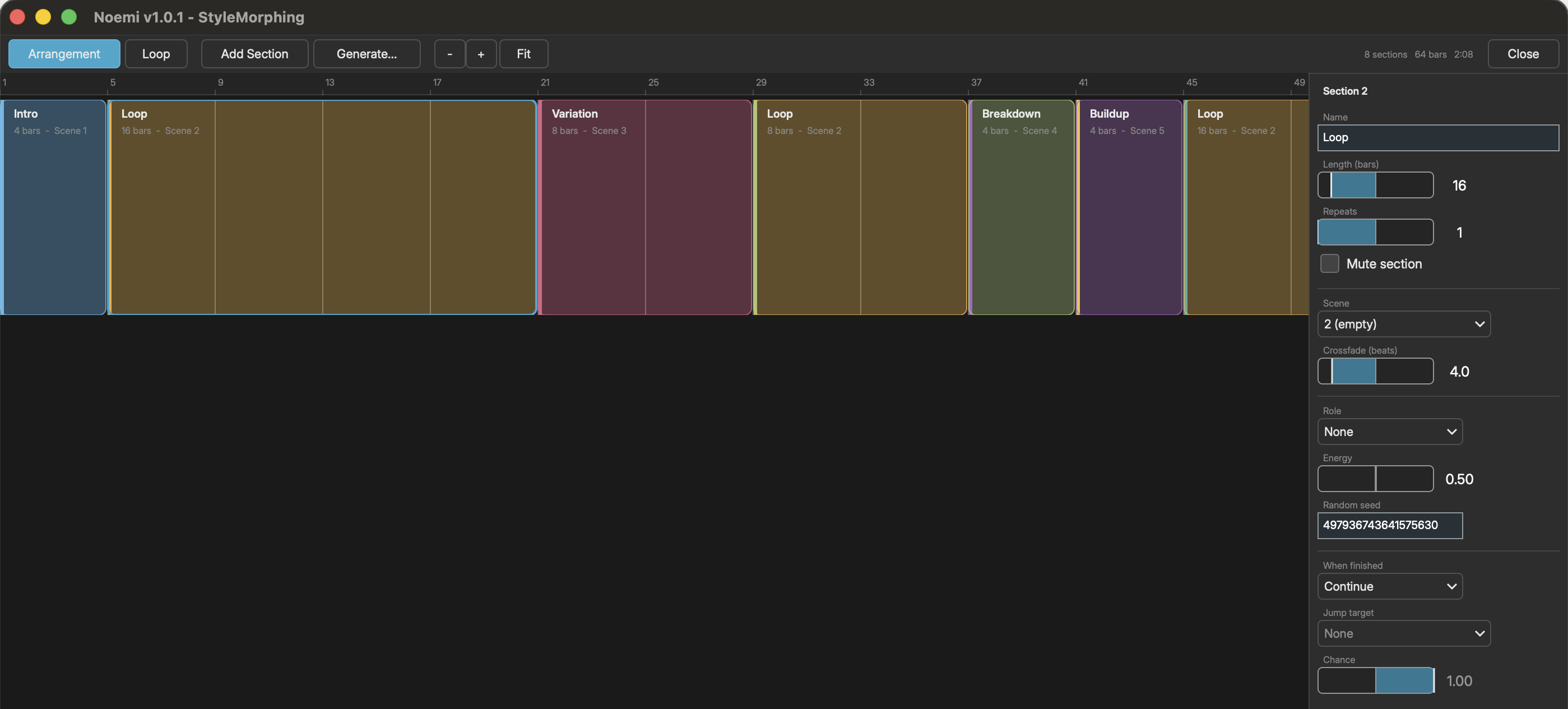
ARRANGEMENT VIEW
Open the full editor with F10 or View > Arrangement View. Press Escape to exit. This is where arrangements are built.
- Toolbar - Enable the arrangement, toggle Loop, add sections, generate a
- structure, zoom in/out or fit the whole song in view
- Ruler - Numbered bars across the top
- Timeline - Section blocks showing name, scene, length, repeats and follow
- action; the current section is outlined while playing
- Lanes - Each automation source gets its own labelled lane underneath
- Inspector - Every property of the selected section, on the right
- Click to select; Cmd/Shift-click to add to the selection
- Drag a section body to reorder it
- Drag either edge to resize (dragging a left edge resizes the section before it)
- Double-click to rename in place
- Right-click for rename, duplicate, mute and delete
- Delete removes the selection, Cmd+D duplicates it, Cmd+A selects all
- Left/Right arrows move the selection; Shift+Left/Right changes section length
- Scroll to pan, Cmd/Ctrl+scroll to zoom
ARRANGEMENT MINI-MAP
A read-only strip in the transport bar shows the sections and the playhead while you work on the canvas:
- Click "Arr" to enable/disable the arrangement
- Double-click or right-click the strip (or click "...") to open the full view
- Scroll to pan, Cmd/Ctrl+scroll to zoom
SONG STRUCTURE GENERATOR
Use File > Generate Song Structure to automatically create arrangements:
- Template - Select a structure (Verse-Chorus, ABAB, Build-Drop, etc.)
- Intensity - Controls overall dynamic range (0-1)
- Seed - Random seed for reproducibility
SECTION PROPERTIES
- Name - Display label for the section
- Length - Duration in bars
- Repeats - How many times to play the section before moving on
- Mute - Skip the section during playback without deleting it
- Scene - Which scene to recall (None = no scene change), picked from your
- scene names. Scenes are numbered 1-16 throughout Noemi.
- Crossfade - Transition length in beats, run BEFORE the section starts
- Role - Musical role (Intro, Verse, Chorus...), published to the conductor
- Energy - Target energy for the conductor's energy curve (0-1)
- Seed - Random seed for generators (0 = free)
By default sections play in order. Noemi recalls each section's scene as the section begins.
A crossfade runs during the END of the previous section, not the beginning of this one, so every section starts cleanly and fully transitioned. Give a 16-bar chorus a 2-bar crossfade and the blend occupies the last 2 bars of whatever came before it; bar 1 of the chorus is already the chorus.
FOLLOW ACTIONS
"When finished" decides what plays after a section's repeats are done:
- Continue - Move to the next section (the default)
- Repeat self - Play the section again
- Random other - Jump to any other unmuted section, chosen at random
- Jump to - Jump to a specific section
Chance sets how often the action fires; the rest of the time playback just continues to the next section. Set it below 100% and the same arrangement takes a different path each run.
Turn on Loop to send playback back to the start instead of stopping at the end. Note that a song using loops, repeats, mutes or follow actions has no fixed length, so the total duration readout only appears for a straight linear arrangement.
CONDUCTOR ENERGY
Each section carries an energy value (0-1). When the conductor is active (any Generator has Follow Conductor turned on -- see Generator), the arrangement drives the conductor's shared energy curve from these per-section values. Energy ramps smoothly toward each new section's target over a couple of seconds, so following generators swell and settle in step with the song's structure instead of jumping abruptly.