Sources
Rhythm
Rhythm · A grid for percussion
0:37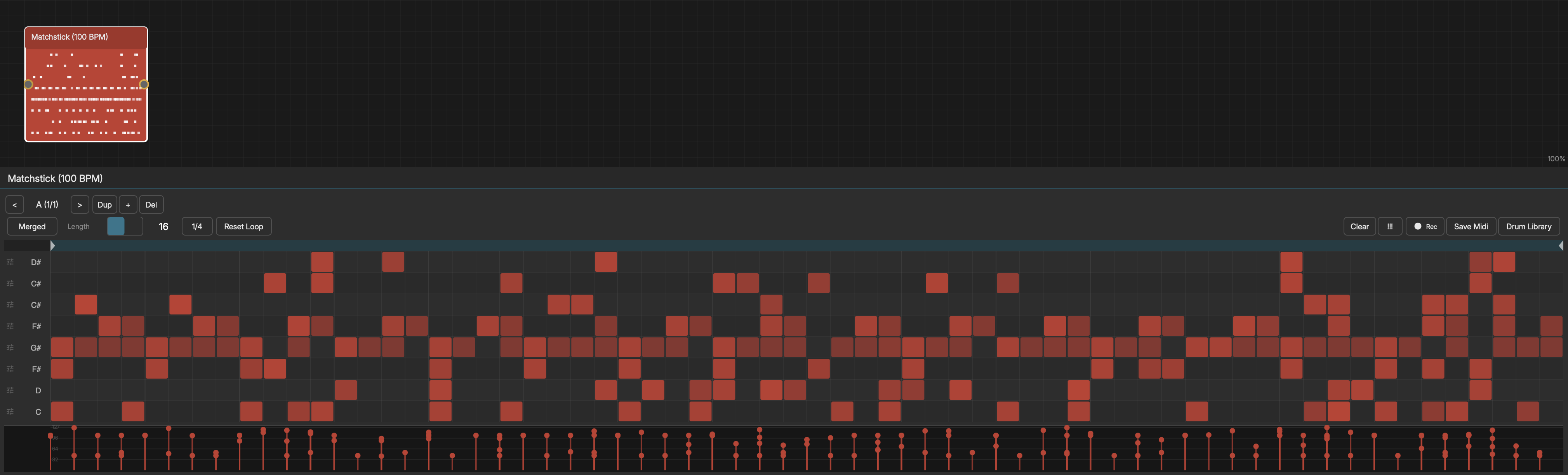
The Rhythm node is an 8-lane drum step sequencer.
STATES (A-P)
Rhythm supports up to 16 states. Each state stores its own hits, lane configurations, and loop region. Use the State Selector to switch between different drum patterns. A Sequencer node can automate state switching during playback.
DRUM GRID
The editor displays 8 horizontal lanes. Double-click a grid cell to add a hit; double-click or right-click a hit to remove it. Click a hit to select it (Shift-click to add or remove from the selection), or click and drag on empty cells to lasso-select multiple hits. Each hit has a velocity value, editable for the whole selection in the velocity lane.
DEFAULT DRUM MAP (General MIDI)
- Lane 1 - Kick (MIDI 36)
- Lane 2 - Snare (MIDI 38)
- Lane 3 - Closed HH (MIDI 42)
- Lane 4 - Open HH (MIDI 46)
- Lane 5 - Clap (MIDI 39)
- Lane 6 - Low Tom (MIDI 45)
- Lane 7 - Crash (MIDI 49)
- Lane 8 - Ride (MIDI 51)
You can reassign any lane to a different MIDI note to match your instrument.
EDITING HITS
- Click a cell to toggle a hit on/off
- Drag up/down on a hit to adjust its velocity
- Right-click a lane label to change its MIDI note assignment
- Use "Clear" to clear a single lane or all lanes
LOOP CONTROLS
- Loop Start - Where the loop begins (in beats)
- Loop End - Where the loop ends
The single playhead traverses all 8 lanes simultaneously.
OUTPUT ROUTING
- Merged - All lanes output together (default)
- Per Lane - Each lane outputs on a separate channel (8 independent outputs)
Per-lane routing lets you send each drum to a different effect chain.
RECORDING
Arm recording to capture live drum input. Play notes via MIDI controller and hits are placed at the current beat position in the matching lane.
MODULATION TARGETS
- Velocity Scale - 0.0 to 2.0
- Swing - 0.0 to 1.0