Sources
Sequencer
Sequencer · A sequence of states
0:41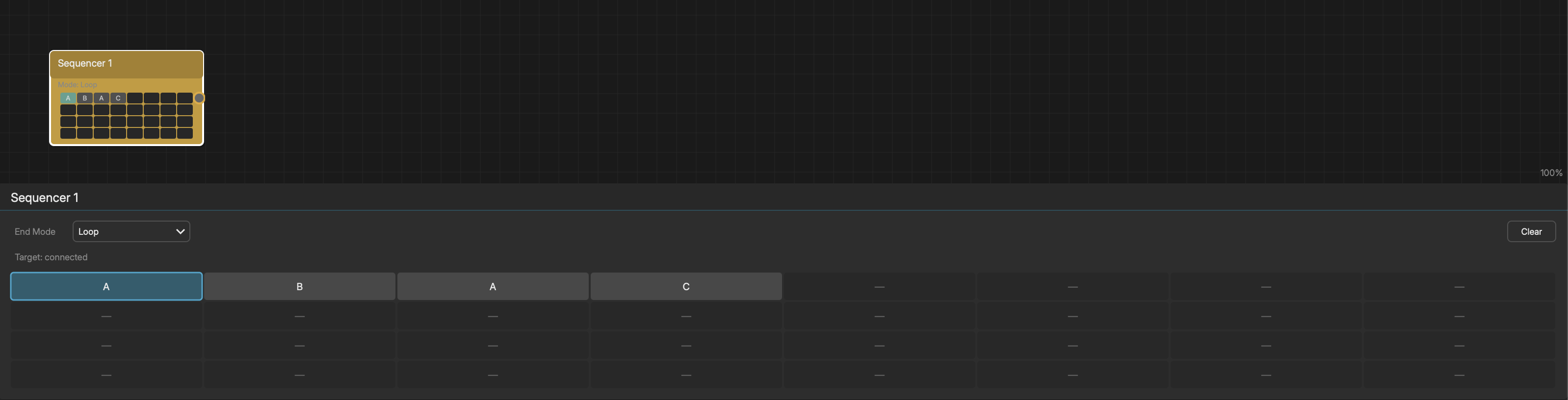
The Sequencer node automates state switching on a target Pattern, Generator, or Rhythm node. It holds a sequence of up to 32 steps, each referencing a state (A-P). When the target node completes a loop, the Sequencer advances to the next step and switches the target's active state.
STEP GRID
The editor shows an 8x4 grid (8 columns, 4 rows = 32 steps). Click a cell to set which state that step activates. Steps are labeled with the state letter (A-P). Empty steps are skipped.
CONNECTING TO A TARGET
- 1Connect the Sequencer's output to a Pattern, Generator, or Rhythm's control input
- 2The Sequencer automatically detects the target's available states
- 3Only valid state indices are shown in the grid
END MODES
- Loop - Restart from the beginning after the last step
- Hold Last - Stay on the final step after reaching the end
- Jump to Step - Jump to a specific step number after the last step
EXAMPLE
To create an evolving drum pattern:
- 1Create a Rhythm node with 4 states (A, B, C, D) -- each with different hits
- 2Create a Sequencer node and connect it to the Rhythm
- 3Set steps: A, A, B, C, A, B, D, C
- 4The Rhythm will cycle through these states as it plays