Modulation & Tuning
Modulation
Modulation · Give a parameter motion
0:39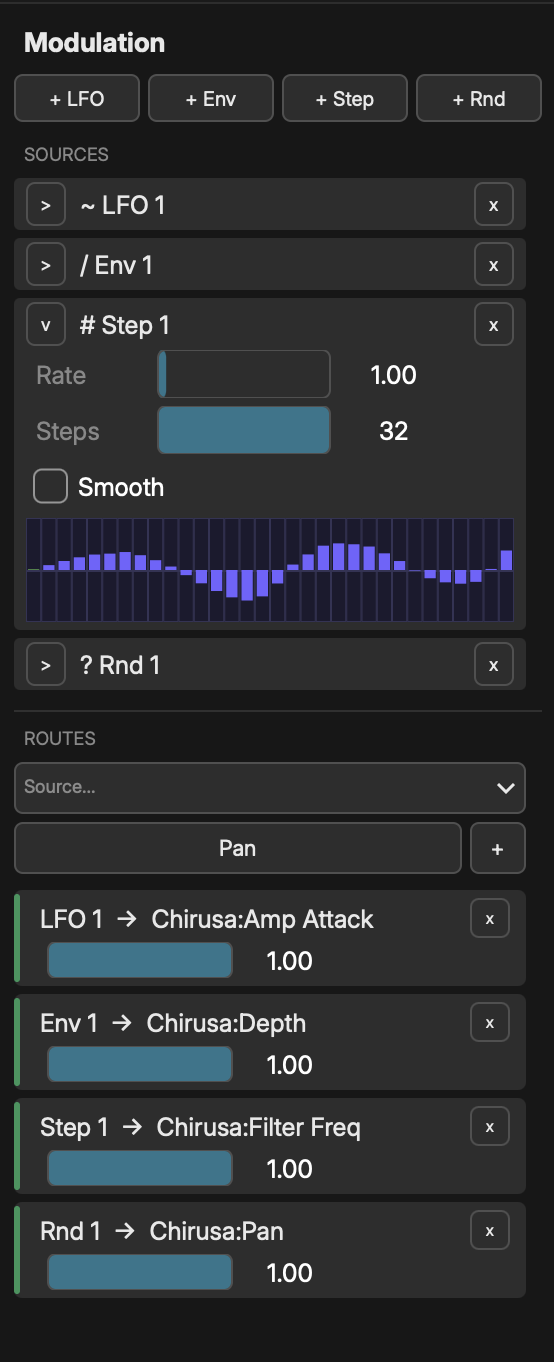
The modulation system lets you animate any parameter over time using modulation sources routed through the modulation matrix.
Open the modulation matrix panel via View > Show Modulation Matrix or press it in the toolbar.
When a route targets a knob's parameter, the knob shows a small dot in the modulator's color, so you can see at a glance which controls are being animated.
Modulation is not confined to Noemi: route a source to a MIDI CC Out module's Value parameter and it leaves as a MIDI controller, shaping a hosted plugin or an external synth. See "MIDI CC Out".
MODULATION SOURCES
Add a source by clicking "Add Source" in the modulation panel and choosing a type:
LFO (Low Frequency Oscillator)
- Shapes: Sine, Triangle, Square, Saw, Reverse Saw, Random
- Frequency: Rate in Hz (free-running) or synced to tempo
- Phase: Initial phase offset (0-1)
- Unipolar: Toggle between 0-1 and -1 to +1 output
- Sync Mode: Free or tempo-synced
- Note Division (synced): Whole, Half, Dotted Quarter, Quarter, Dotted Eighth,
- Quarter Triplet, Eighth, Dotted Sixteenth, Eighth Triplet, Sixteenth,
- Sixteenth Triplet, Thirty-Second
Envelope (ADSR)
- Attack: Rise time in seconds
- Decay: Fall time to sustain level
- Sustain: Hold level (0-1)
- Release: Fade time after note off
- Trigger: Select which node's note events trigger the envelope
Step Sequencer
- Steps: Number of steps (default 8)
- Values: Per-step level (0-1), click and drag to draw
- Rate: Steps per beat in Free mode (the caption shows the current value)
- Sync: Locks each step to a musical division (1/1 to 1/32, dotted and triplet)
- Smooth: Toggle interpolation between steps
Random (Sample & Hold)
- Mode: Sample & Hold, Smooth, or Noise
- Rate: Triggers per beat
- Smoothness: Interpolation amount (0-1)
- Seed: Random seed for reproducibility
Envelope Follower
- Tracks the amplitude of an audio source and outputs it as a modulation signal. Select which audio track to follow.
Audio Sidechain
- Triggers an envelope or gate from an audio input. Select the source track and configure threshold and response.
Macro Knobs
- User-defined knobs that map to multiple targets with individual scaling. Macro sources appear in the modulation panel and can be assigned to MIDI CC for hardware control.
- In plugin builds, the first 8 macro sources are also exposed to the host DAW as automatable parameters named Macro 1 through Macro 8. Automate them from your DAW, or MIDI-learn them in the host, to drive whole banks of Noemi parameters from a single automation lane. The bridge is bidirectional -- twisting a macro card in Noemi writes automation back to the host, and host automation moves the card.
ROUTING
To create a modulation route:
- 1Add a modulation source
- 2Click "Add Route" on the source
- 3Choose a target parameter from the dropdown
- 4Adjust the depth knob
DEPTH
The depth control (-1.0 to +1.0) sets how strongly the source affects the target. Negative depth inverts the modulation. Multiple sources can modulate the same target (their effects are added together).
ADVANCED FEATURES
- Rate Multiplication - Double or halve modulation speed relative to tempo
- Response Curves - Custom curves (exp, log, S-curve) per route
- Cross-Modulation - Modulation sources can modulate other modulation parameters (e.g., LFO rate -> another LFO)
- MIDI-to-Modulation - Map incoming MIDI CC, velocity, or aftertouch as modulation sources