Getting Started
Overview
Meet Noemi · Music in a living patch
1:19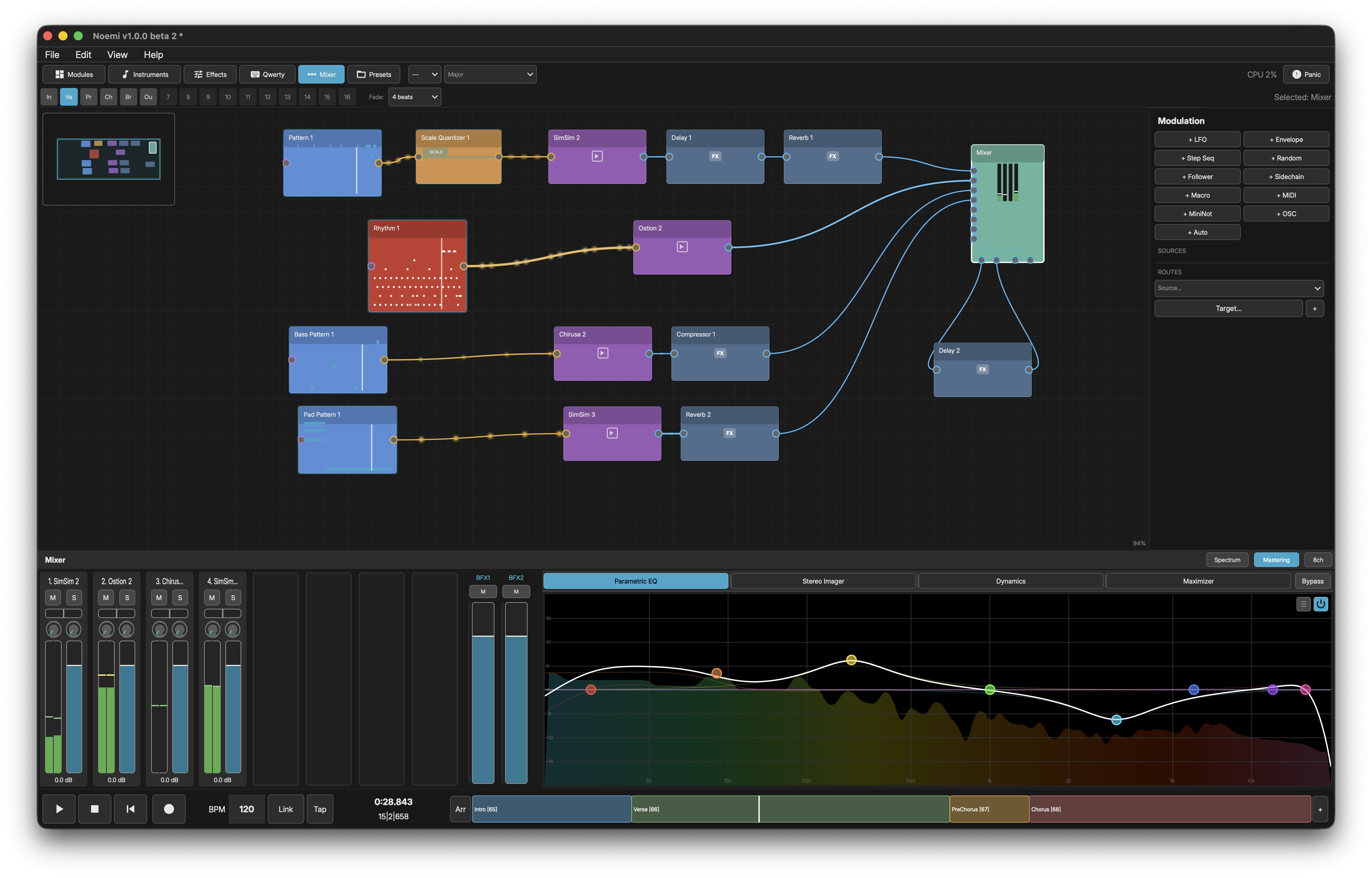
Noemi is a non-deterministic composition machine. Instead of traditional linear sequencing, it uses a node-based graph where you wire together different composition building blocks to create evolving, generative music.
SIGNAL FLOW
Audio and MIDI signals flow left-to-right through the node graph:
- Source Nodes (Pattern, Generator, Rhythm, LiveCode, Waveform, Slicer, Granular)
- -> Transformer Nodes (modify notes/timing)
- -> Instrument/Effect Nodes (produce/shape sound)
- -> Mixer (master output)
Source nodes generate or play back musical data. Transformers process that data in real-time. Instruments convert MIDI to audio. Effects process audio. Everything routes to the Mixer for final output.
NODE TYPES
- Pattern - MIDI piano roll with 4 independent playheads
- Generator - Rule-based probabilistic note generation
- Rhythm - 8-lane drum step sequencer
- LiveCode - Text-based pattern generator using mini-notation
- Waveform - Audio sample player with 4 playheads
- Slicer - MIDI-triggered audio slicer with transient detection
- Granular - Granular synthesis with free-running and MIDI-triggered modes
- Sequencer - Automates state changes on Pattern/Generator/Rhythm
- MIDI Output - Sends notes to external hardware or other apps
- MIDI Input - Receives from external MIDI controllers or apps
- MIDI Splitter - Filters incoming MIDI to multiple outputs by channel
- MIDI CC Out - Sends a modulatable value out as a MIDI controller
- OSC Input - Receives OSC note messages from external controllers
- OSC Output - Sends generated notes as OSC messages
- Audio Input - Receives live audio from system input or DAW (plugin mode)
- Transformer - Processes notes in real-time (18 types)
- Cantia - Formant voice synthesizer with phoneme sequencing
- Chirusa - Built-in 4-oscillator subtractive synth
- Leeroy - Synthesis-based drum machine with 8 channels
- Ostion - Built-in 8-slot drum sampler
- SimSim - Wavetable morphing synthesizer with dual oscillators
- Internal Effects - Chorus, Compressor, Delay, EQ, Multimode Filter, Phaser, Reverb, Utility
- Plugin - Hosts external AU/VST3/CLAP/LV2 instruments and effects
- Mixer - Master output with per-track mixing and spectrum analyzer
MULTI-STATE
Pattern, Generator, and Rhythm nodes support up to 16 states (labeled A through P). Each state stores independent data -- different notes, different hits, different generation rules. Switch states manually with the State Selector widget, or automate state changes with a Sequencer node.
CONNECTIONS
Nodes connect via ports. MIDI signals (note data) flow from sources through transformers to instruments. Audio signals flow from instruments through effects to the mixer. You can create complex routing by wiring multiple sources to the same instrument, or splitting one source to many destinations.
CABLE COLORS
Connection cables are color-coded by signal type:
- Amber - MIDI (note data)
- Blue - Audio (sound)
- Gold - Control signals (sequencer state changes, modulation)