Transform & Sound
Instruments & Effects
SimSim · Wavetable motion
0:37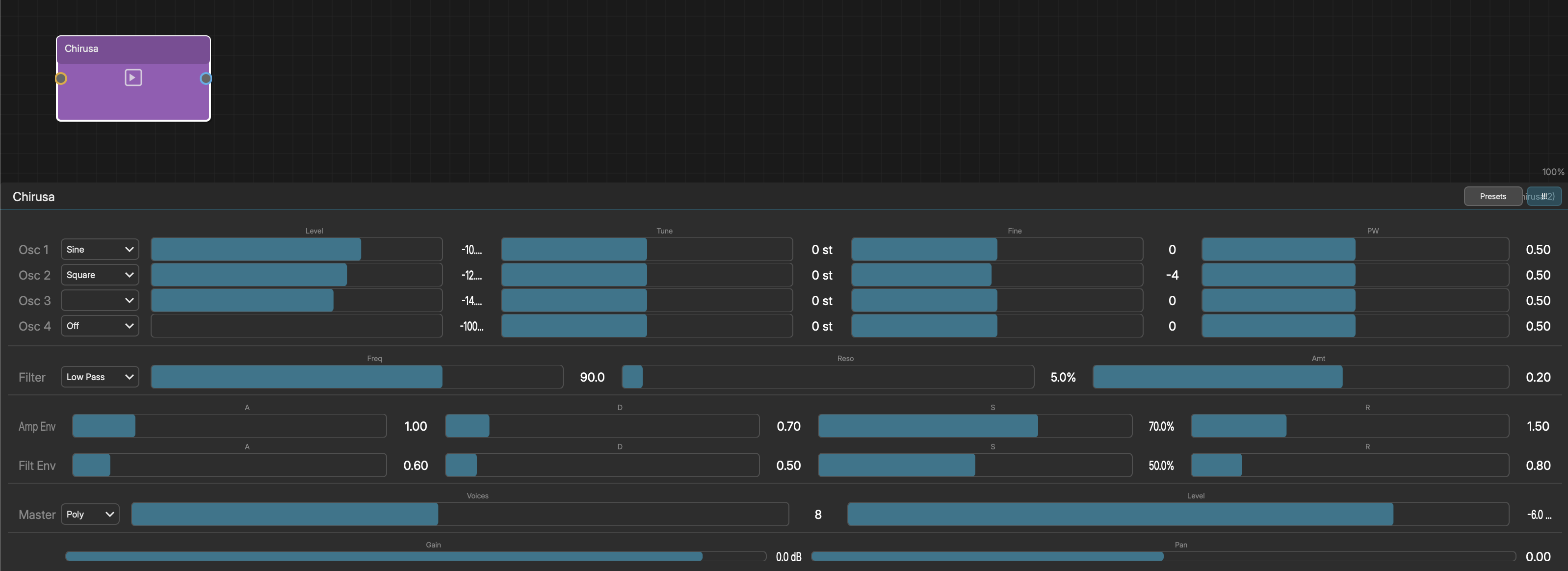
CANTIA (FORMANT VOICE SYNTHESIZER)
Cantia is a voice synthesizer that models the human vocal tract using formant synthesis. A glottal pulse drives three parallel bandpass filters (formants F1, F2, F3) to produce vowel and consonant sounds.
Voice Types: Soprano, Alto, Tenor, Bass, Whisper (noise-only), Robot (narrow/metallic)
Lyric Input: Type plain text and Cantia parses it into syllables. Use IPA brackets for specific phonemes (28 available), glide arrows for transitions (e.g., [aa>ow]), uppercase for stress, and trailing underscore for sustain.
Parameters:
- Voice - Type, Breathiness, Vibrato Depth, Vibrato Rate, Formant Shift
- Amp - Attack, Decay, Sustain, Release
- Phoneme - Speed, Consonant Sharpness, Vowel Blend
- Chorus - Toggle with Speed, Depth, Mix settings
- Reverb - Toggle with Size, Damping, Mix settings
- Master - Level, Voice Mode (Mono/Legato/Poly), Voices (1-8)
Lyrics support up to 16 states with the State Selector. 12 factory presets: Soprano, Alto, Tenor, Bass, Whisper, Robot, Choir Pad, Gregorian, Ethereal, Beatbox, Vowel Drone, Chant.
The Presets button loads a built-in preset, saves the current voice as a user preset ("Save as Preset..."), or opens the full preset browser ("Browse All..."). User presets are stored in your preset library and load live into Cantia.
CHIRUSA (4-OSCILLATOR SUBTRACTIVE SYNTH)
Chirusa is Noemi's built-in synthesizer. Add it via Instruments > Chirusa. New instances load a random preset for instant sound.
PRESETS
Click the "Presets" button to choose from 10 factory presets:
- Pluck - Bright saw pluck with LP filter sweep
- Velvet - Warm sine pad
- Blade - Aggressive detuned saws
- Glass - Bell-like sine harmonics
- Drift - Evolving filtered square pad
- Ember - Warm mono bass
- Frost - Airy high-passed triangle texture
- Volt - Punchy square lead
- Haze - Soft noise-layered atmosphere
- Spark - Short metallic stab
PARAMETERS
- 4 Oscillators, each with:
- Waveform - Sine, Triangle, Saw, Square, Pulse
- Level - Volume (0-1)
- Tune - Coarse tuning in semitones (-48 to +48)
- Fine - Fine tuning in cents (-100 to +100)
- Pulse Width - Width of pulse wave (0-1)
- Filter:
- Type - Low Pass, High Pass, Band Pass, etc.
- Frequency - Cutoff frequency (20-20000 Hz)
- Resonance - Filter resonance (0-1)
- Amount - Filter envelope depth
- Amp Envelope (ADSR):
- Attack, Decay, Sustain, Release
- Filter Envelope (ADSR):
- Attack, Decay, Sustain, Release
- Master:
- Level - Master volume
- Voices - Number of polyphony voices
- Mode - Mono or Poly
- Randomize ("!!!") - Randomizes all parameters for sound exploration
LEEROY (SYNTHESIS DRUM MACHINE)
Leeroy is a synthesis-based drum machine with 8 channels. Unlike Ostion which uses samples, Leeroy generates sounds from oscillators, noise, and envelopes -- giving you deep control over every drum sound. Uses the same MIDI note mapping as Ostion (36, 38, 42, 46, 39, 45, 49, 51).
Per-Channel Parameters:
- Oscillator - Wave Shape, Tune (-24 to +24 st), Pitch Decay
- Noise - Level, Color (200 Hz - 16 kHz lowpass)
- Amp - Attack, Hold, Decay (AHD envelope, no sustain)
- Tone - Filter Cutoff, Resonance
- Character - Drive (soft-clip saturation)
- Output - Level, Pan
The pitch envelope is key to Leeroy's character: the oscillator starts at 4x base frequency and decays to 1x, creating the characteristic analog drum punch.
8 preset kits: Default Kit, 808 Classic, 909 Analog, Minimal Techno, Industrial, Lo-Fi, Trap, Electro. The Presets button loads a built-in kit, saves the current kit as a user preset ("Save as Preset..."), or opens the full browser ("Browse All..."). Randomize button randomizes the current channel only, and leaves the output level untouched.
OSTION (8-SLOT DRUM SAMPLER)
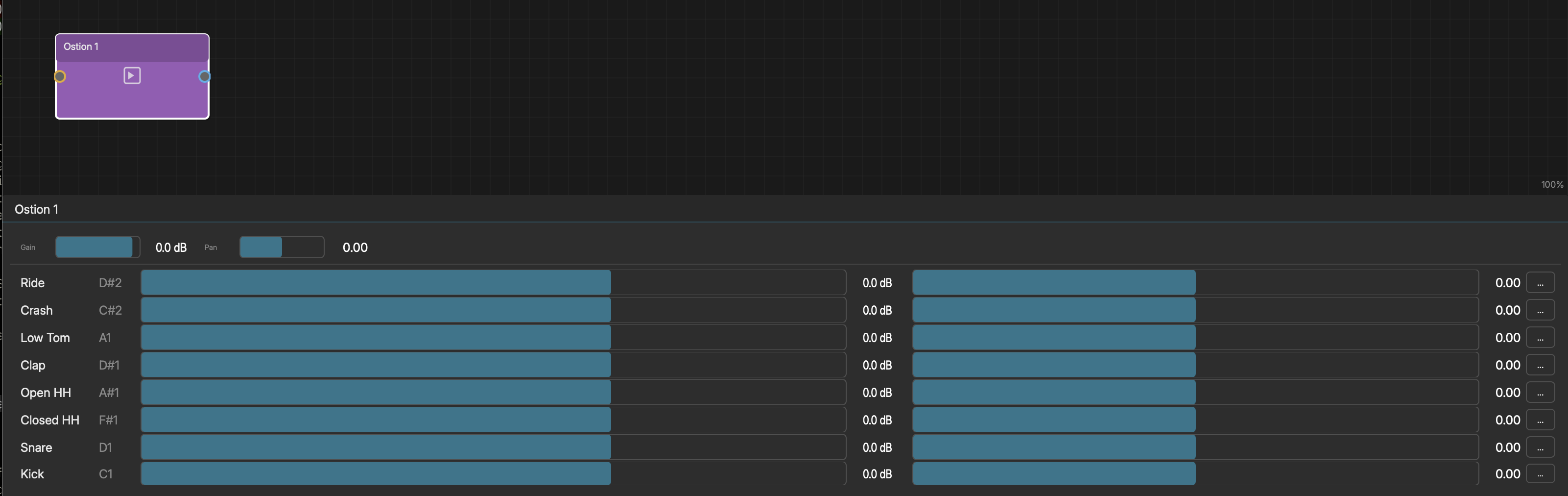
Ostion is Noemi's built-in drum machine. Add it via Instruments > Ostion.
- 8 sample slots, each with:
- Sample - Audio file name (load via "..." button)
- Note - MIDI note trigger (36-43 for slots 1-8)
- Gain - Volume (0-2)
- Pan - Stereo position (-1 left to +1 right)
- Load your own samples or use the built-in drum sounds (Kick, Snare, Closed HH, Open HH, Clap, Low Tom, Crash, Ride).
SIMSIM (WAVETABLE MORPHING SYNTHESIZER)
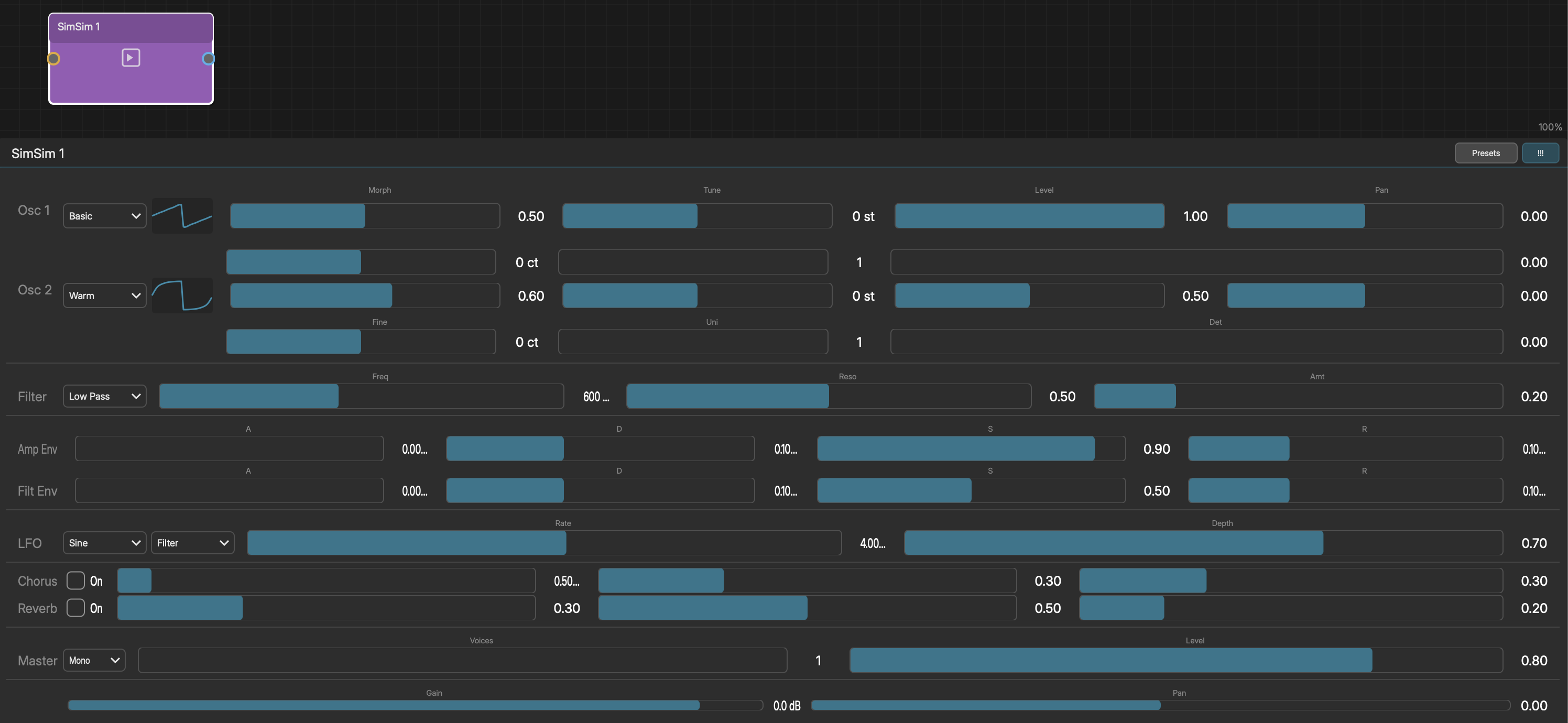
SimSim is a dual-oscillator wavetable synthesizer where each oscillator morphs between waveforms within a wavetable stack.
Oscillators (x2):
- Wavetable - 8 stacks: Basic, PWM, Formant, Digital, Metallic, Warm, Ethereal, Vocal
- Morph - Crossfade position within the wavetable (0-1)
- Tune - Coarse tuning (-24 to +24 semitones)
- Fine - Fine tuning (-100 to +100 cents)
- Level - Volume (0-1)
- Unison - 1-4 voices with Detune spread
- Pan - Stereo position (-1 to +1)
Filter (Cytomic SVF):
- Type - Off, Low Pass, High Pass, Band Pass
- Frequency - 10 Hz to 22 kHz
- Resonance - Filter resonance
- Env Amount - Filter envelope depth
Envelopes & LFO:
- Amp ADSR, Filter ADSR
- LFO: Sine/Triangle/Saw/Square/S&H
- LFO Route: Osc1 Morph, Osc2 Morph, Pitch, Filter
- Rate (0.1-20 Hz), Depth
Effects: Chorus (Speed, Depth, Mix), Reverb (Size, Damping, Mix) Master: Level, Voice Mode (Mono/Legato/Poly, 1-8 voices)
12 factory presets: Morphscape, Digital Pluck, Warm Bass, Crystal Bell, Vocal Drift, Glitch Lead, Ethereal Strings, PWM Lead, Texture Wash, Formant Stab, Metal Pad, Sub Wobble. Real-time waveform display.
INTERNAL EFFECTS
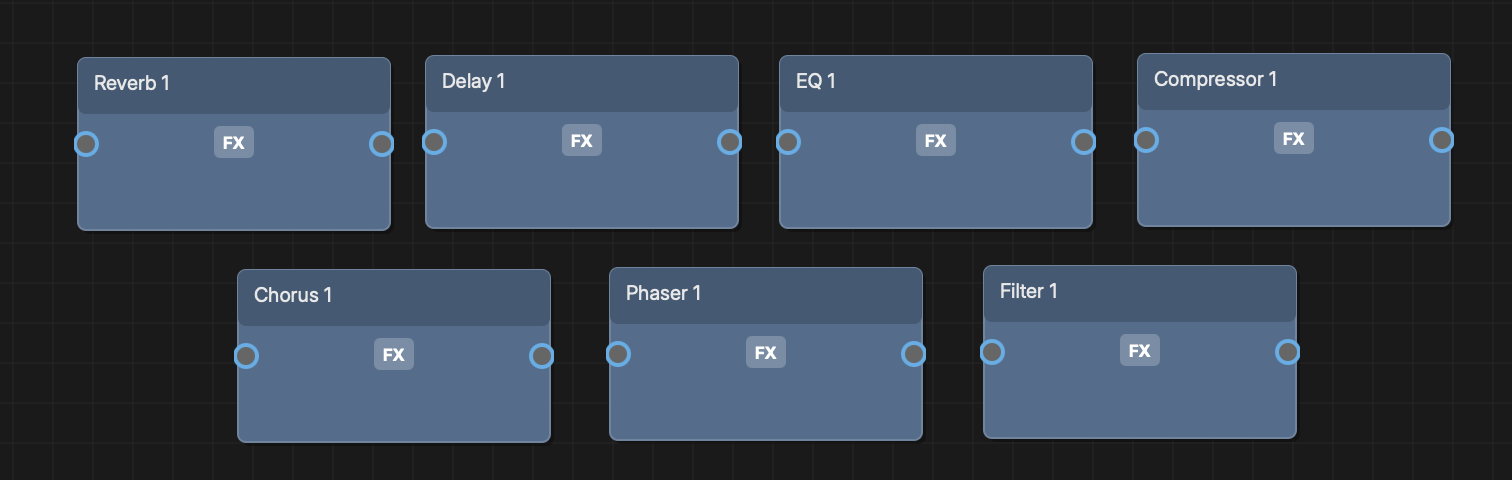
Noemi includes 8 built-in audio effects that require no external plugins. Each effect has 8 factory presets and a Randomize button. All parameters are modulatable. Every internal effect can also save the current settings as a user preset and browse the full library, and user presets load live into the effect. Randomize shuffles the sound but never changes the effect's output level.
- Reverb - Room Size, Damping, Mix, Width
- Delay - Feedback, Mix, Length
- EQ (4-band) - Frequency, Gain, Q per band
- Compressor - Threshold, Ratio, Attack, Release, Output
- Chorus - Depth, Width, Speed, Mix
- Phaser - Depth, Rate, Feedback
- Multimode Filter - Frequency, Type (LP/HP/BP)
- Utility - Gain, Width, Balance, plus Mono, Swap L/R, and per-channel polarity invert toggles. The channel toolbox: trim a level mid-chain, fold a stereo source to mono, widen or narrow it, or fix a flipped cable.
SIDECHAIN
An effect whose plugin has a sidechain input - a compressor, gate, or ducker with a key input - grows a second input port on its node once it loads. Wire any audio source into that port and it becomes the key signal: the classic move is a kick drum keying a compressor on a bass or pad, so the sustained part ducks on every hit.
The key source keeps its own place in the mix - the cable feeds the effect's detector, not its audio path. The internal Compressor accepts a key this way too (wiring it switches its detector to the sidechain input). One key per effect: connecting a new source replaces the old.
Hover the port to check which is which: the tooltip reads "Sidechain in". The Connect menu offers sidechain-capable effects twice, once normally and once as "- Sidechain".
A multi-output plugin cannot take a sidechain key (and a sidechain-capable plugin that starts using its extra output pairs gives its key up) - the two live on different hosting mechanisms.
MIDI INTO AN EFFECT
Some audio effects are played, not just patched: harmonisers, vocoders, MIDI-keyed filters and pitch tools listen to notes while they process audio. An effect whose plugin declares a MIDI input grows a "MIDI in" port once it loads, and anything that emits MIDI drives it - a Pattern, a Generator, MIDI Input, a Transformer, or another plugin's MIDI out port.
The cable carries notes only; the effect still takes its audio from its main input as usual. Drop a MIDI cable anywhere on the node and it snaps to the MIDI port rather than the audio one, so there is no small dot to aim for. The port takes as many cables as an instrument does, and CC, pitch bend and MPE expression travel down it alongside the notes - which is what makes a plugin's MIDI learn work from a controller patched into Noemi.
Hover to confirm: the tooltip reads "MIDI in", and the pin takes the MIDI colour while the audio input and any sidechain key stay audio-coloured. The Connect menu lists these effects as "- MIDI in". A plugin with both a key input and a MIDI input shows all three ports, in that order.
As with the sidechain key, a multi-output plugin using its extra output pairs cannot take MIDI this way.
EXTERNAL PLUGINS
Noemi hosts AU, VST3, CLAP, and LV2 plugins for both instruments and effects:
- Instruments > (plugin list) - Add external synths/samplers
- Effects > (plugin list) - Add external audio effects
Supported plugin formats by platform:
- macOS - AU, VST3, CLAP, LV2
- Windows - VST3, CLAP, LV2
- Linux - VST3, CLAP, LV2, LADSPA
All of these support multi-output plugins, as instruments and as effects. See Multi-Output Plugins below.
External plugin windows open in separate floating windows. CLAP plugins render their native GUI within Noemi. Plugin states are saved with the project.
Each plugin node shows which format it is running - a small VST3, AU, CLAP or LV2 badge under the plugin name, repeated in the node's tooltip and in the plugin window's title bar. This matters more than it sounds: the same plugin installed in two formats is otherwise indistinguishable once loaded, and the two builds are not always equivalent. Several plugins ship a stereo-only AudioUnit alongside a multi-out VST3.
MULTI-OUTPUT PLUGINS
A plugin with more than one stereo output - a drum sampler with a pair per pad, a modular host, a multitimbral sampler - shows those extra pairs as additional output ports on its node. Wire each one wherever you like: its own mixer channel, an effect chain of its own, or nowhere at all.
This works in every format Noemi hosts - AU, VST3, CLAP and LV2 - and for both instruments and effects.
- 1Load the plugin and open it
- 2Configure its outputs inside the plugin, if it needs that (Kontakt and Battery do; VCV Rack and Cardinal expose theirs immediately)
- 3Close the plugin window - the node now shows one port per available pair
- 4Drag from any port to a mixer channel or an effect
Hover a port to see which pair it carries: "Out 5/6". Port 1 is always the plugin's main output, and a MIDI-producing plugin keeps its MIDI port after it, before the audio pairs.
Multi-output effects work the same way. The effect still processes the chain it sits in - audio arrives, is processed, and leaves on the main pair as always - while its extra pairs branch off to wherever you send them.
Each pair gets its own mixer strip, named after the plugin and its pair ("Kontakt 3/4") until you rename it, with its own fader, pan, and mute. Multitrack export writes each wired pair as its own stem, and each pair can be assigned to its own Noemi output pair independently (see Multiple Audio Outputs).
Three things worth knowing:
- The pairs appear once the plugin has loaded and told Noemi how many it has. A plugin that gains outputs later - Kontakt, when you add channels on its Outputs page - may need its window closed and reopened before the new ports show up.
- Format matters. If a plugin offers only one stereo pair when you expect more, check the badge: NI's AudioUnits are stereo-only where their VST3s are multi-out, and some plugins ship separate stereo and multi-out variants (Cardinal is 8-in/8-out, while Cardinal Synth and Cardinal FX are stereo by design).
- A plugin with several outputs is hosted in a rack behind the scenes so its extra pairs can escape a stereo track. This is automatic and needs no setup, but it is why a multi-output plugin's entry in the mixer looks slightly different from an ordinary one.
IF A HOSTED PLUGIN LOOKS WRONG
Plugins draw their own interfaces, so Noemi's theme and colours never reach inside a plugin window. If a plugin's UI looks black, blank, or oddly lit, check the plugin's own display settings before assuming Noemi is at fault - modular hosts in particular have rack and room brightness controls that can be turned down to nothing by accident.
PLUGIN SEARCH PATHS
Noemi scans standard system directories for plugins on each platform. To view the default scan paths or add custom plugin directories, go to File > Plugin Settings.
The Plugin Settings dialog shows each plugin format with its default search paths (read-only) and a list of custom paths you have added. Use the Add button to browse for additional plugin folders and the Remove button to delete custom paths. Custom paths are saved automatically and persist across sessions.
Default plugin locations:
- VST3:
- macOS - ~/Library/Audio/Plug-Ins/VST3, /Library/Audio/Plug-Ins/VST3
- Windows - %LOCALAPPDATA%\Programs\Common\VST3, %ProgramFiles%\Common Files\VST3
- Linux - ~/.vst3, /usr/lib/vst3, /usr/local/lib/vst3
- CLAP:
- macOS - ~/Library/Audio/Plug-Ins/CLAP, /Library/Audio/Plug-Ins/CLAP
- Windows - %LOCALAPPDATA%\Programs\Common\CLAP, %ProgramFiles%\Common Files\CLAP
- Linux - ~/.clap, /usr/lib/clap
- LV2:
- macOS - ~/Library/Audio/Plug-Ins/LV2, /Library/Audio/Plug-Ins/LV2, ~/.lv2
- Windows - %APPDATA%\LV2, %COMMONPROGRAMFILES%\LV2
- Linux - ~/.lv2, /usr/lib/lv2, /usr/local/lib/lv2
- AU (macOS only):
- Discovered automatically by the system - no directory configuration needed.
- LADSPA (Linux only):
- Uses LADSPA_PATH environment variable, or /usr/lib/ladspa, /usr/local/lib/ladspa, ~/.ladspa
After adding custom paths, rescan plugins to discover newly added plugins.
IF A SCAN MISBEHAVES
Each plugin is examined in a separate helper process, so a plugin that crashes during inspection can never take Noemi down - it is marked as failed (blacklisted) and skipped from then on. Only a genuine crash earns that mark: a scan that fails for environmental reasons (a slow machine, an interrupted scan) leaves your plugins alone and simply retries next time.
If a plugin you trust ends up blacklisted, open File > Plugin Settings, use the options menu to remove blacklisted files, and rescan.
To test a single plugin from a terminal, run the standalone app with --scan-file:
- macOS - /Applications/Noemi.app/Contents/MacOS/Noemi --scan-file <path to plugin>
- Linux - ./Noemi --scan-file <path to plugin>
It scans just that file through the normal machinery and prints everything it finds - handy output to include in a support report.
MIDI EFFECT PLUGINS
Noemi automatically detects MIDI effect plugins (AU aumf type, VST3 with zero audio I/O). MIDI effects display blue MIDI pins and a "MIDI FX" badge. Chain them between a source and instrument: Pattern -> MIDI Effect -> Instrument -> Mixer.
An instrument plugin can also be switched into MIDI-effect mode with "Use as MIDI Effect" in its editor panel, which is how MIDI-producing plugins that classify themselves as effects (arpeggiators, step sequencers) are used.
A MIDI effect reaches the rest of the graph one of two ways, chosen automatically from what you patch it into:
- Wired straight to a single instrument, the plugin is inserted into that
- instrument's own plugin chain, so its MIDI arrives sample-accurately.
- Anything else - a Transformer in between, a MIDI Output node, a MIDI Splitter, or
- fan-out to two instruments - routes its MIDI through Noemi's graph instead, which
- costs about a millisecond of timing accuracy but lets every module see it.
You do not choose between these; patching decides it. Before 1.0.4 only the first case worked at all: a MIDI effect in any other arrangement was silent, could not drive a MIDI Output, and its cables never animated.
PLUGIN MIDI OUT PORT
Plugins that produce MIDI (arps, sequencers, Rack-style hybrids) get a second output port carrying that MIDI, below the audio port. Patch it into an instrument, a Transformer, a MIDI Splitter, or a MIDI Output node - the plugin drives other modules while its own audio keeps flowing to the mixer. The two cables stay independent: notes generated inside Noemi never leak into the MIDI port, and captured plugin MIDI never doubles into the audio chain.
GAIN AND PAN
Every instrument and effect node has per-node gain and pan controls:
- Gain - -60 dB to +6 dB
- Pan - Left (-1) to Right (+1)