Sources
Pattern
Pattern · One phrase, several directions
0:37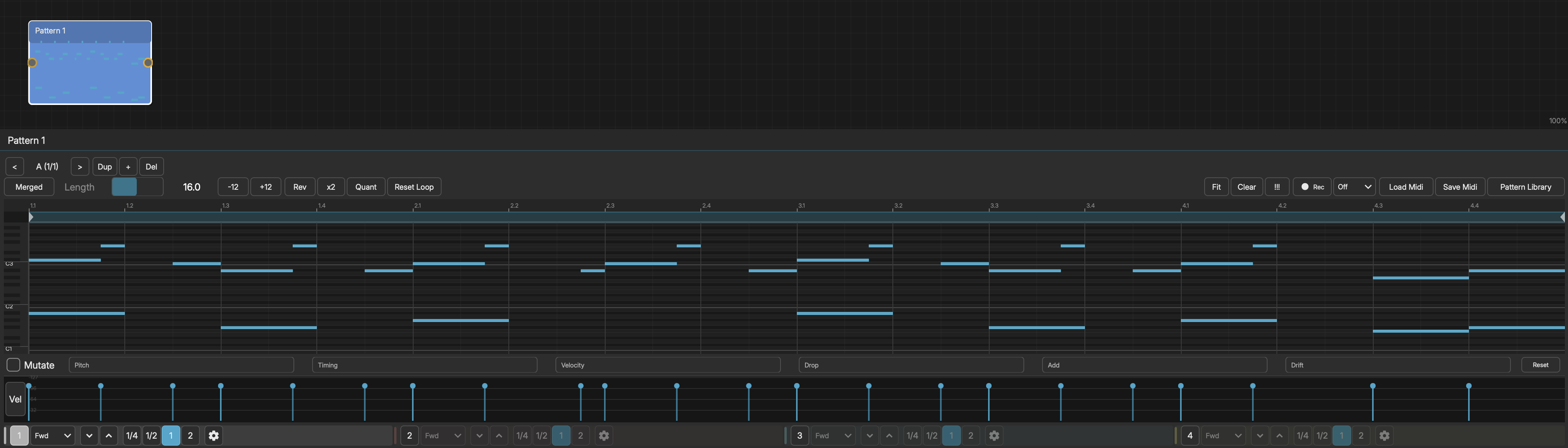
The Pattern node is a MIDI piano roll with 4 independent playhead lanes.
STATES (A-P)
Pattern supports up to 16 states. Each state stores its own set of notes, loop region, lane configs, mutation settings, and output routing. Use the State Selector below the editor to navigate between states, duplicate the current state, or add new ones. A Sequencer node can automate state switching during playback.
PIANO ROLL EDITOR
Open the Pattern editor by double-clicking the node or selecting it and pressing Enter. The editor shows a grid with pitch on the vertical axis and time (beats) on the horizontal axis.
- Double-click to place a note (keep the second click held and drag to set its length)
- Double-click or right-click a note to delete it
- Click and drag on empty space to lasso-select multiple notes
- Drag a note to move it (a selected group moves together)
- Drag the right edge of a note to resize it
- Click a note to select it; Shift-click to add or remove from the selection
- Scroll vertically to see more pitches
- Use the scrollbars and zoom buttons to navigate
4 PLAYHEAD LANES
Each Pattern has 4 independent playhead lanes, color-coded:
- Lane 1 (White) - Enabled by default
- Lane 2 (Coral)
- Lane 3 (Teal)
- Lane 4 (Yellow)
Each lane can be configured independently:
- Speed Ratio - Playback speed multiplier (e.g., 0.5 = half speed, 2.0 = double)
- Direction - Forward, Reverse, or Pendulum (alternating)
- Pitch Offset - Transpose in semitones
- Inverted - Mirror pitches around middle C
- Velocity - Velocity multiplier for notes on this lane
Multiple lanes reading the same notes at different speeds and directions create polyrhythmic textures.
LOOP CONTROLS
- Loop Start - Where the loop region begins (in beats)
- Loop End - Where the loop region ends
All lanes share the same loop region. The loop points define which portion of the pattern plays back.
OUTPUT ROUTING
- Merged - All lanes output together (default)
- Per Lane - Each lane outputs separately (4 independent outputs)
Per-lane routing lets you send each playhead to a different instrument.
TRANSFORMS
The Pattern editor toolbar provides non-destructive transforms:
- Transpose - Shift all notes up or down by semitones
- Reverse - Flip the pattern backwards in time
- Stretch - Time-stretch the pattern (affects note positions and durations)
- Quantize - Snap note start times to a grid
MUTATION
Mutation adds controlled randomness to pattern playback. When enabled, notes gradually drift from their original positions each time the pattern loops.
- Pitch Drift - Probability of pitch shifting per note
- Timing Drift - Maximum timing offset in beats
- Velocity Drift - Maximum velocity variation
- Note Drop - Probability of dropping a note
- Note Add - Probability of adding a note
- Drift Accumulate - 0 = fresh each loop, 1 = cumulative drift
- Max Pitch Dev - Maximum semitones a note can drift from baseline
Use "Capture Baseline" to save the current pattern state, and "Reset to Baseline" to restore it.
RECORDING
Arm recording on a Pattern to capture live MIDI input:
- 1Select the Pattern node
- 2Click the Record button in the transport
- 3Play notes via MIDI controller or the on-screen QWERTY keyboard
- 4Notes are recorded at the current playback position
SAVE / DRAG OUT AS MIDI
The Pattern toolbar includes a Save MIDI button that exports the pattern's loop region as a standard MIDI file (Type 0, 480 ticks per quarter note).
- Click the button to open a save dialog and choose where to write the .mid file.
- Or drag the button straight onto a DAW track or the Finder/Explorer to drop the clip -- no dialog needed.
This is handy for capturing a generative moment and continuing it in another tool.
VELOCITY & EXPRESSION LANES
Below the piano roll, the expression lane editor provides 5 modes for per-note expression data. Click the lane mode selector to switch between:
- Vel - Velocity: per-note strike intensity (0-127)
- AT - Aftertouch: per-note channel pressure
- Prs - Pressure: MPE polyphonic pressure (per-note continuous)
- Sld - Slide: MPE slide / CC 74 (per-note continuous)
- PB - Pitch Bend: MPE per-note pitch bend
Click and drag in the lane to draw expression values. These lanes enable full MPE (MIDI Polyphonic Expression) output when connected to MPE-capable instruments.
MODULATION TARGETS
- Transpose - -24 to +24 semitones
- Velocity Scale - 0.0 to 2.0
- Swing - 0.0 to 1.0