Sources
Slicer
Slicer · Recompose a recording
0:37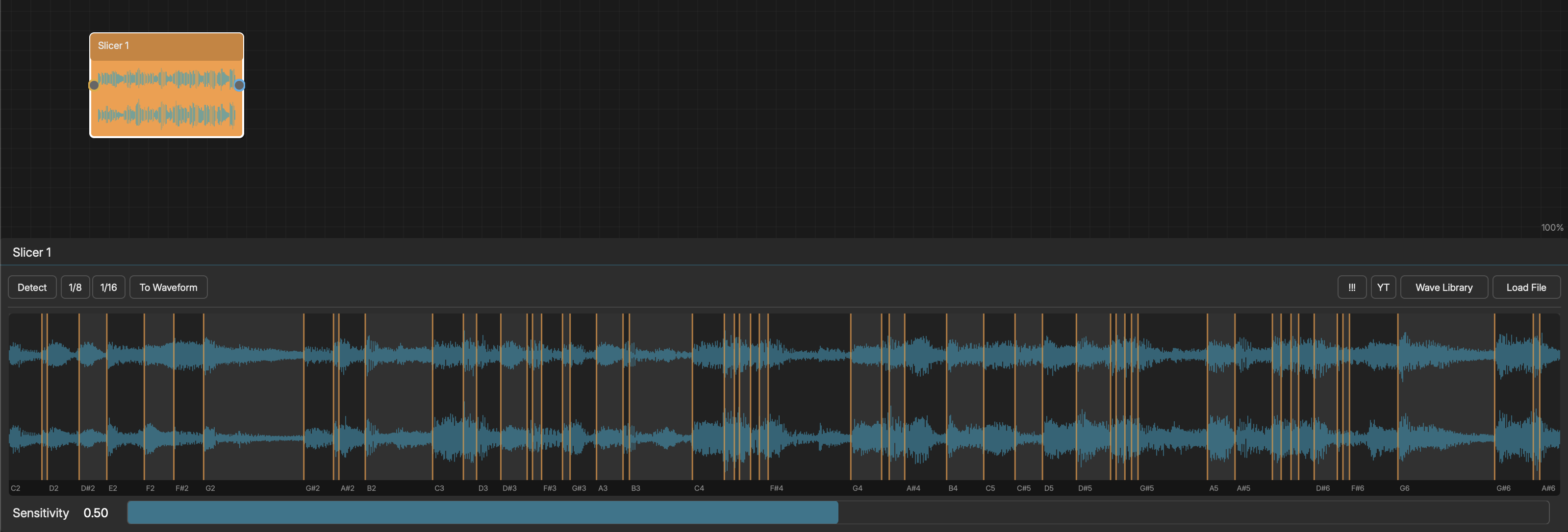
The Slicer node is a MIDI-triggered audio slicer. It loads an audio file, divides it into slices, and plays individual slices triggered by incoming MIDI notes.
LOADING AUDIO
- Use "Load File" to browse for an audio file
- Use "Wave Library" to select from built-in audio
- Use "YT" to fetch audio from a YouTube URL (requires internet)
- Supported formats: WAV, AIFF, FLAC, MP3, OGG (and REX/RX2 when available)
The waveform display shows the audio with colored slice markers.
SLICE MODES
- Detect - Energy-based transient detection (automatic slice placement)
- 1/8 - Even division at 8th-note intervals
- 1/16 - Even division at 16th-note intervals
TRANSIENT DETECTION
When using Detect mode, the Sensitivity slider controls how aggressive the detection is:
- Low sensitivity - Only the strongest transients become slice points
- High sensitivity - More slices from quieter transients
Slice markers automatically snap to the nearest zero-crossing for clean playback.
TRIGGERING SLICES
Each slice maps to a MIDI note starting at C2 (MIDI note 48):
- Slice 1 = C2, Slice 2 = C#2, Slice 3 = D2, ...
Connect a Pattern, Generator, or Rhythm node to the Slicer's input, and notes in the C2+ range will trigger the corresponding slices.
PREVIEW
Click on a slice in the editor waveform display to preview it. Active slices glow during playback.
TO WAVEFORM
Click "To Waveform" to copy the loaded audio to a connected Waveform node for further manipulation.
SCRIBBLE (AUDIO SCRUBBER)
Slicer also supports Scribble mode. Works the same as Waveform Scribble, with the addition that scrubbing across slice boundaries auto-snaps playback to the start of each new slice. When you click "Done", the captured audio replaces the slicer's content and transient detection is automatically re-applied.
AUDIO SOURCE RECORDING
If the Slicer has an audio input connection, hold the Rec button to capture live audio from the connected source.